




Free Lightroom Preset – Punchy HDR
2013
 Harmeet Gabha

[et_pb_section bb_built=”1″ admin_label=”section” next_background_color=”#000000″][et_pb_row admin_label=”row” background_position=”top_left” background_repeat=”repeat” background_size=”initial”][et_pb_column type=”4_4″][et_pb_text background_position=”top_left” background_repeat=”repeat” background_size=”initial” _builder_version=”3.11.1″]
A new Lightroom Preset – Punchy HDR
Sharing a Lightroom Preset that I have been using in Adobe Lightroom 4 (LR4) which creates a [tooltip text=”High Dynamic Range”]HDR[/tooltip] photo from your Single photo. To take the most advantage of this preset it is best suitable for RAW image format as opposed to JPEG. This is because, RAW file format has much more dynamic range so pushing the photo to various extremes still gives you a great result.
Download
Don’t forget to share, your support helps us create more content.
[/et_pb_text][et_pb_blurb url_new_window=”off” use_icon=”on” font_icon=”%%82%%” icon_color=”#e09900″ use_circle=”off” circle_color=”#e09900″ use_circle_border=”off” circle_border_color=”#00a8ff” icon_placement=”left” animation=”off” background_layout=”light” text_orientation=”left” use_icon_font_size=”off” use_border_color=”off” border_color=”#ffffff” border_style=”solid” background_position=”top_left” background_repeat=”repeat” background_size=”initial” image_max_width=”100%”]
Lightroom 5 Users:  Check out the LR5 version of this Punchy HDR Preset which has been updated to suit LR5.
[/et_pb_blurb][/et_pb_column][/et_pb_row][/et_pb_section][et_pb_section bb_built=”1″ fullwidth=”off” specialty=”off” prev_background_color=”#000000″ next_background_color=”#000000″][et_pb_row background_position=”top_left” background_repeat=”repeat” background_size=”initial”][et_pb_column type=”1_2″][et_pb_cta admin_label=”Complete Bundle Advert in Post” global_module=”3358″ saved_tabs=”all” title=”Get Premium Presets for Lightroom” button_url=”http://gabha.photography/buy/presets/complete-lightroom-preset-bundle/?utm_source=PI&utm_medium=Web&utm_campaign=InPost-CompleteBundle” url_new_window=”on” button_text=”Show me More!!” use_background_color=”off” background_color=”#00a8ff” background_layout=”light” text_orientation=”center” use_border_color=”off” border_color=”#ffffff” border_style=”solid” custom_button=”off” button_letter_spacing=”0″ button_use_icon=”default” button_icon_placement=”right” button_on_hover=”on” button_letter_spacing_hover=”0″ background_position=”top_left” background_repeat=”repeat” background_size=”initial”]
[/et_pb_cta][/et_pb_column][et_pb_column type=”1_2″][et_pb_cta admin_label=”HDR Advert in Post” global_module=”2945″ saved_tabs=”all” title=”Ultimate HDR Preset Pack for Lightroom” button_url=”http://gabha.photography/buy/presets/ultimate-hdr-preset-pack-for-lr4-and-lr5/?utm_source=PI&utm_medium=Web&utm_campaign=InPost” url_new_window=”on” button_text=”Show me More” use_background_color=”off” background_color=”#00a8ff” background_layout=”light” text_orientation=”center” header_font_size=”26″ body_font_size=”14″ use_border_color=”off” border_color=”#ffffff” border_style=”solid” custom_button=”off” button_text_size=”20″ button_border_width=”2″ button_border_radius=”3″ button_letter_spacing=”0″ button_use_icon=”default” button_icon_placement=”right” button_on_hover=”on” button_border_radius_hover=”3″ button_letter_spacing_hover=”0″ background_position=”top_left” background_repeat=”repeat” background_size=”initial”]

[/et_pb_cta][/et_pb_column][/et_pb_row][/et_pb_section][et_pb_section bb_built=”1″ fullwidth=”off” specialty=”off” prev_background_color=”#000000″][et_pb_row background_position=”top_left” background_repeat=”repeat” background_size=”initial”][et_pb_column type=”4_4″][et_pb_text background_layout=”light” text_orientation=”left” use_border_color=”off” border_color=”#ffffff” border_style=”solid” background_position=”top_left” background_repeat=”repeat” background_size=”initial”]
Before (Raw File)
The photo below is straight out of the camera in RAW format, no editing done.

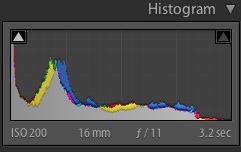
You can see the image is very dark and notice the histogram is also compressed.
After
After we apply the Lightroom Preset Punchy HDR, notice the histogram how it pops up to life and well the result is just amazing!!


Before and After

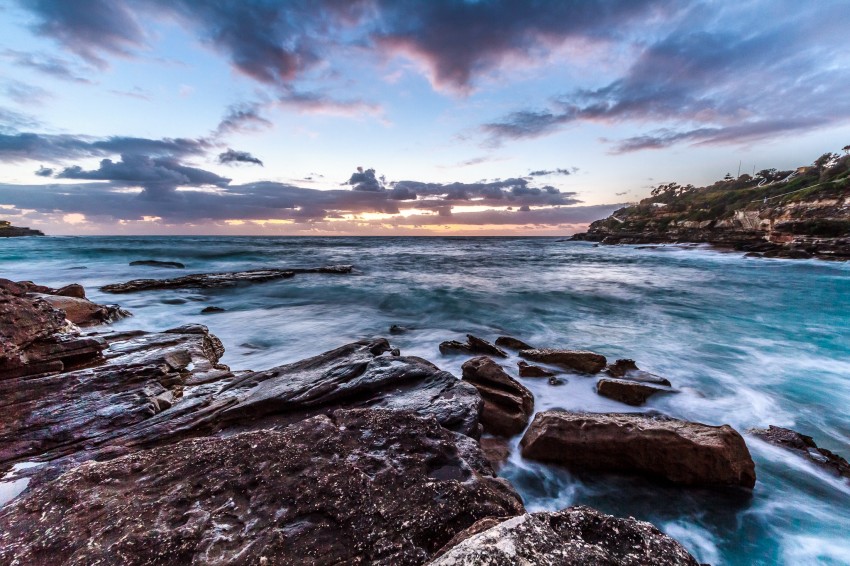
[box type=”shadow”] The preset will be a great starting point for you but feel free to tweak the settings to get the best out of your photo. If you like our Free Preset, leave us a comment or share with your friends online[/box]
Samples


Installation
Watch the video below to get started with installing the preset and start using it on your computer. Steps are the same for Lightroom 4 or Lighroom 5.
- Unzip the downloaded file in any desired folder.
- Launch your Lightroom 4 on your computer
- Switch to Develop Module and navigate to the Preset>User Presets in the left panel
- Right Click on “User Presets” folder and select Import
- Locate the folder where you unzipped the downloaded file
- Select the Preset and click Import
- And your Preset is installed
[/et_pb_text][/et_pb_column][/et_pb_row][/et_pb_section]


Thanks for sharing .. Help yourself to my Free Lightroom Presets
I’m fairly new to Lightroom, and particularly to HDR photography (in which I’m very interested). This is the first Lightroom preset I’ve downloaded and it’s blown me away! Thanks very much for sharing, much appreciated. Cheers.
Thanks for the feedback. I’d love to see what you create with it. Post a link here if you put your processed photo online.
A couple of early efforts here…
http://www.flickr.com/photos/k3v1n5/9576355710/in/photostream
…and here…
http://www.flickr.com/photos/k3v1n5/9575782552/in/photostream/
In both cases, I eased off just a tad on the blue and green saturation, but that was all the adjustment I applied.
Nice work Kevin. I like the second one more as it has lots of texture and detail in it.
Hi,
I’ve downloaded the zip file 5 times and keep getting Invalid/Corrupt error messages when trying to extract.
?
Which software do you use to open the zip file? Are you using Windows or Mac, pls specify version?
Did you try any of the other presets as well http://gabha.me/presets ? Was the result the same?
Hi Harmeet,
I was using Win7 at work when I first downloaded the file — those attempts were not successful. I just now downloaded it at home using Win8 and the file (and preset) work fine.
Can’t explain it, but thanks for responding and thanks for this cool effect. 🙂
No worries my pleasure. Please feel free to share the photos here which you create with the preset. I would love to see how you use the preset on your photos.
http://www.howardowen.net/img/s9/v89/p1669685663-4.jpg
I think this one might have actually used Late Afternoon HDR. I like them both. 🙂

What a great result!!! Thanks for sharing Howard. 😉
By the way, what car is that?? Its got a Ford badge but I’ve not seen it here in Australia.
It’s a Ford GT, a perfectly wonderful car that was only built for two years.
http://en.wikipedia.org/wiki/Ford_GT
Thanks for the comment on my photo; your presets are now a valuable part of my processing arsenal.
Does this preset only work in LR 4 & 5? I still only have LR3
LR3 and LR4 are very different. Adobe changed the entire Develop interface and its development sliders. I am sorry but I almost certain that this preset is not compatible with LR3.
Hi, I can’t see download link 🙁 where I can find and download this beautifull hdr preset ?
Normally the page refreshes to display the link, on some browser this doesn’t happen correctly. Please check your email for the links.
Thanks for visiting my site.
Harmeet
Me gustan mucho sus presets. gracias por compartirlos
Usted es bienvenido
Wow, Amazing!!
Thank you Ahmad, i’m glad you like the results.
Great Preset… Love the Punchy effect!!
Great preset
Thank you Adel
Hi, I can’t seem to be able to obtain the download link, even after liking the preset. Can you please email it to me? Cheers!
Please check your email Rebeca, i’ve sent you the link. Enjoy!
I love these effects!!!
Thanks nyna19866.
5
0