Wednesday, October 14, 2026
Photography

Lightroom Dashboard – Catalog Analytics

12Jul
2016
Harmeet Gabha 0
Lightroom Dashboard – Catalog Analytics
[et_pb_section fb_built=”1″ admin_label=”section” _builder_version=”3.22″][et_pb_row admin_label=”row” _builder_version=”3.25″ background_size=”initial” background_position=”top_left” background_repeat=”repeat”][et_pb_column type=”4_4″ _builder_version=”3.25″ custom_padding=”|||” custom_padding__hover=”|||”][et_pb_text admin_label=”Text” _builder_version=”4.4.4″ background_size=”initial” background_position=”top_left” background_repeat=”repeat” hover_enabled=”0″ use_border_color=”off” border_color=”#ffffff” border_style=”solid”]

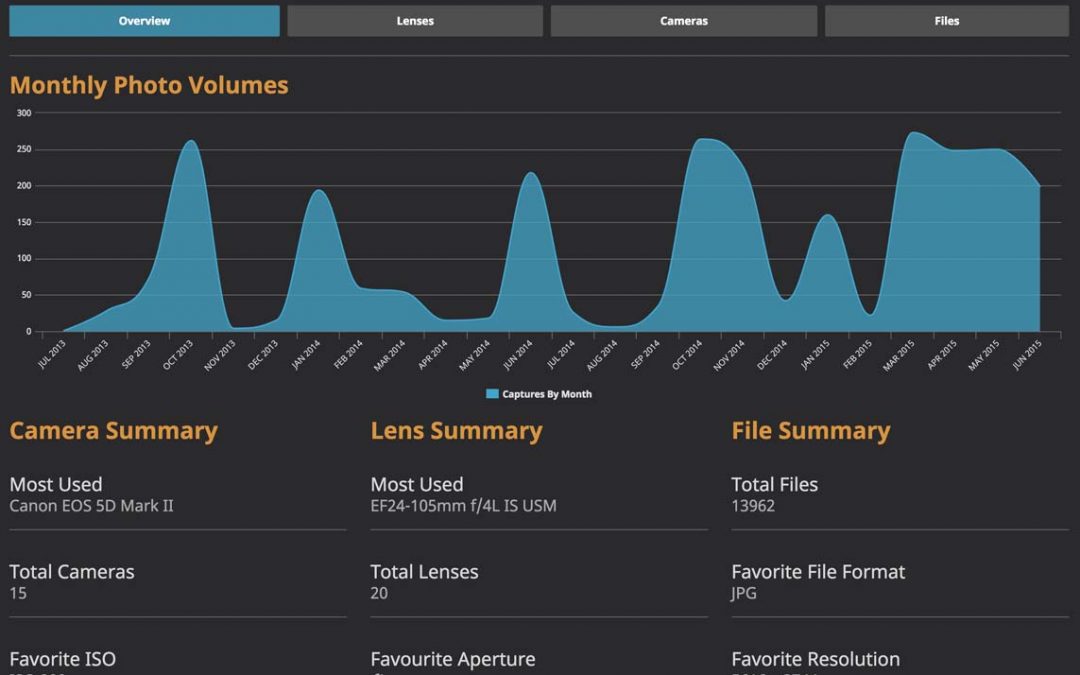
Ever wonder what kind of photographer you are, technically? What’s your favourite Aperture? What’s your favourite Focal Length? In 2014, I did a post about Lightroom Analytics (obsolete) which as a plugin you could download and use to analyse your catalog. Unfortunately the plugin is no longer available, but there is another called Lightroom Dashboard.

It is an online tool where you can submit your catalog for analysis and it produces some very interesting analytics about your images. According to their website the catalog is not uploaded to their website it’s simply analysed in your browser and then the data is presented in the Dashboard.

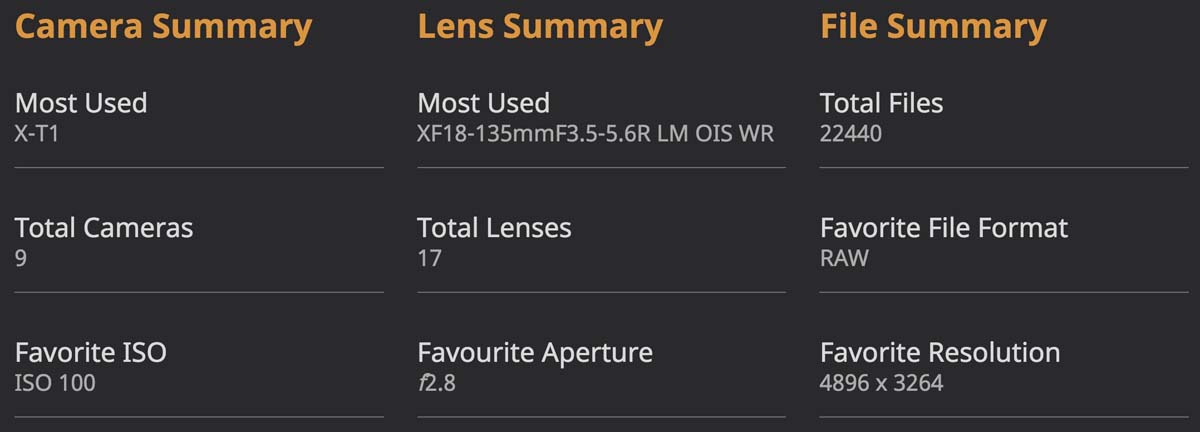
[/et_pb_text][/et_pb_column][/et_pb_row][/et_pb_section][et_pb_section fb_built=”1″ custom_padding_last_edited=”on|desktop” admin_label=”Section” _builder_version=”3.22″ background_color=”#2a2a2a” custom_padding_tablet=”50px|0|50px|0″ transparent_background=”off” padding_mobile=”off” make_fullwidth=”off” use_custom_width=”off” width_unit=”on”][et_pb_row admin_label=”Row” _builder_version=”3.25″ background_size=”initial” background_position=”top_left” background_repeat=”repeat”][et_pb_column type=”4_4″ _builder_version=”3.25″ custom_padding=”|||” custom_padding__hover=”|||”][et_pb_text admin_label=”Text” _builder_version=”3.27.4″ background_size=”initial” background_position=”top_left” background_repeat=”repeat” background_layout=”dark” use_border_color=”off” border_color=”#ffffff” border_style=”solid”]  So I had a go at using this and uploaded my 1.5Gb to analyse my catalog. Here is what I found out: [/et_pb_text][et_pb_image src=”https://photoinsomnia.com/wp-content/uploads/2016/07/Lightroom_Dashboard.jpg” alt=”Lightroom Catalog – 2 Years” show_in_lightbox=”on” align=”center” align_tablet=”center” align_last_edited=”on|desktop” admin_label=”Image” _builder_version=”3.23″ use_border_color=”off” border_color=”#ffffff” border_style=”solid” animation=”off” sticky=”off” always_center_on_mobile=”on”] [/et_pb_image][et_pb_text admin_label=”Text” _builder_version=”3.27.4″ background_size=”initial” background_position=”top_left” background_repeat=”repeat” background_layout=”dark” use_border_color=”off” border_color=”#ffffff” border_style=”solid”]Looking at the statistics for last 2 years, I see that
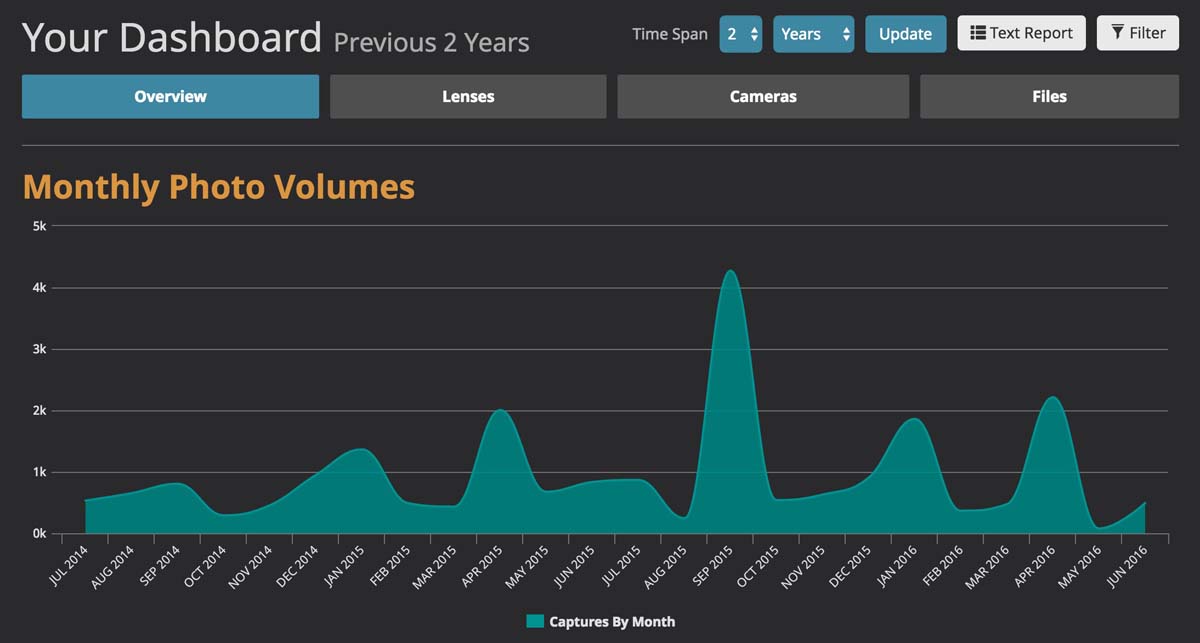
  • Most used camera is the Fujifilm X-T1
  • Most used lens is XF 18-135mm F3.5-5.6 R LM OIS WR
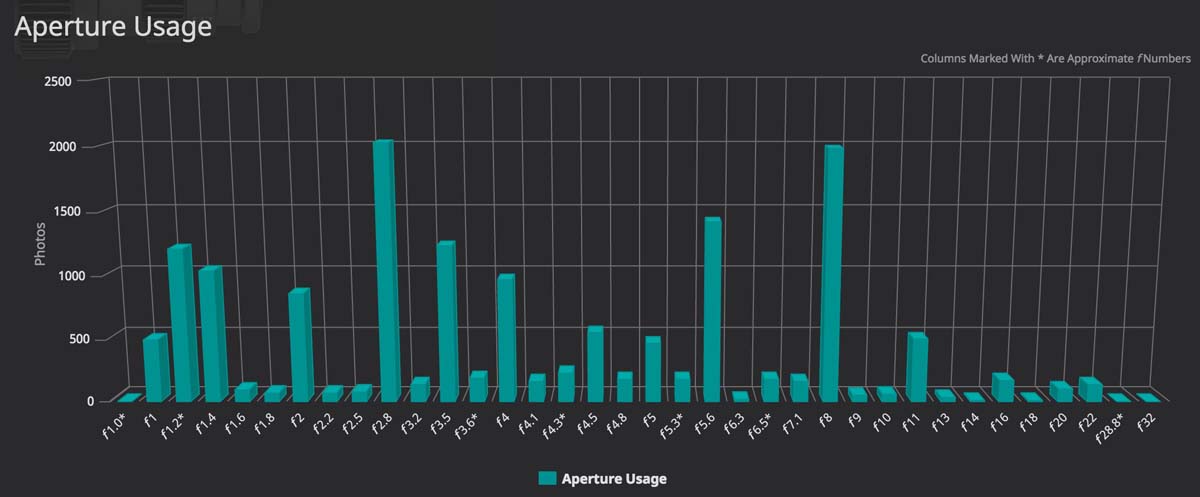
  • Favourite Aperture is F2.8
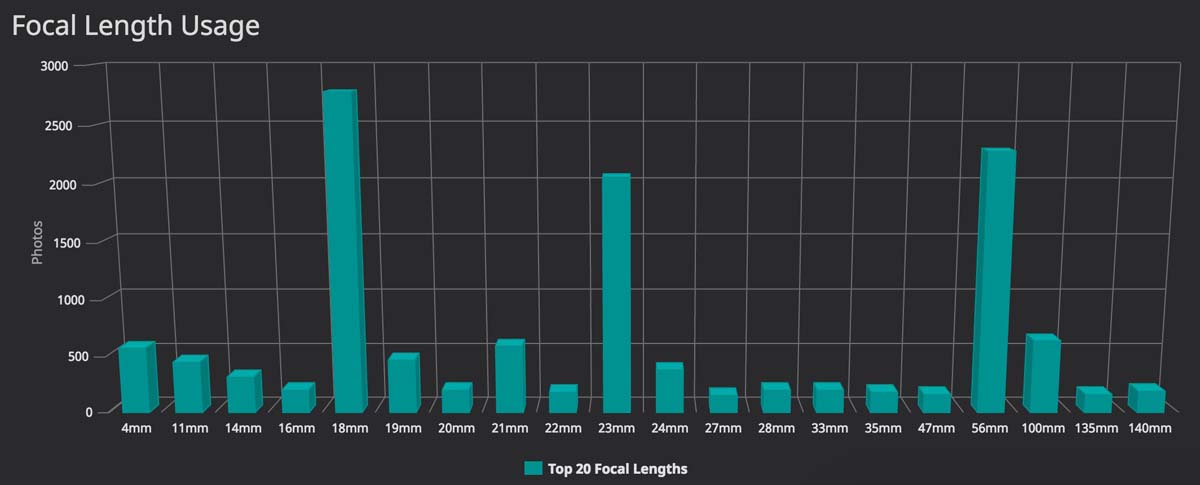
I like how the metrics make you realise what sort of shooting styles we have. For me mostly shooting at 18mm, 56mm and 23mm respectively. It helps you know if a particular lens is right for you or if your lens is sitting collecting dust so you can get rid of it. Go check it out for yourself and discover what you really like shooting most with. [/et_pb_text][et_pb_image src=”https://photoinsomnia.com/wp-content/uploads/2016/07/Lightroom_Dashboard_Summary.jpg” alt=”General Summary” show_in_lightbox=”on” align=”center” align_tablet=”center” align_last_edited=”on|desktop” admin_label=”Image” _builder_version=”3.23″ use_border_color=”off” border_color=”#ffffff” border_style=”solid” animation=”off” sticky=”off” always_center_on_mobile=”on”] [/et_pb_image][/et_pb_column][/et_pb_row][et_pb_row admin_label=”Row” _builder_version=”3.25″ background_size=”initial” background_position=”top_left” background_repeat=”repeat” column_structure=”1_2,1_2″][et_pb_column type=”1_2″ _builder_version=”3.25″ custom_padding=”|||” custom_padding__hover=”|||”][et_pb_image src=”https://photoinsomnia.com/wp-content/uploads/2016/07/Aperture_Usage.jpg” alt=”Aperture Usage” show_in_lightbox=”on” align=”center” align_tablet=”center” align_last_edited=”on|desktop” admin_label=”Image” _builder_version=”3.23″ use_border_color=”off” border_color=”#ffffff” border_style=”solid” animation=”off” sticky=”off” always_center_on_mobile=”on”] [/et_pb_image][/et_pb_column][et_pb_column type=”1_2″ _builder_version=”3.25″ custom_padding=”|||” custom_padding__hover=”|||”][et_pb_image src=”https://photoinsomnia.com/wp-content/uploads/2016/07/Focal_Length_Usage.jpg” alt=”Focal Length Usage” show_in_lightbox=”on” align=”center” align_tablet=”center” align_last_edited=”on|desktop” admin_label=”Image” _builder_version=”3.23″ use_border_color=”off” border_color=”#ffffff” border_style=”solid” animation=”off” sticky=”off” always_center_on_mobile=”on”] [/et_pb_image][/et_pb_column][/et_pb_row][/et_pb_section]

Leave a Reply

Your email address will not be published. Required fields are marked *

This site uses Akismet to reduce spam. Learn how your comment data is processed.

Pin It on Pinterest

Spread the Word

Thanks for visiting my blog. Please spread the word and share this post with your friends!!